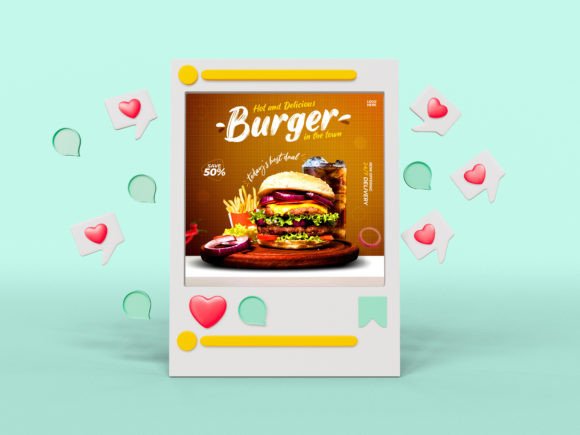
Special Food Social Media Post Banner
In the crowded digital landscape of Instagram, Facebook, and Pinterest, food is not just sustenance; it is visual storytelling. Whether you are a home baker showcasing your latest sourdough creation or a restaurant owner promoting a seasonal menu update, the difference between a scroll-past and a double-tap often comes down to presentation. This is where a Special Food Social Media Post Banner becomes an indispensable tool for content creators who want to elevate their brand without spending hours in complex design software.
A social media banner template serves as the foundation for consistent, professional-looking posts. It bridges the gap between high-quality photography and engaging graphic design, ensuring that your culinary content looks polished and intentional. By utilizing a pre-designed structure, you can focus on what matters most: the food itself and the story behind it.
Why Visual Consistency Matters for Food Brands
When users browse their feeds, they subconsciously look for patterns and familiarity. A cohesive aesthetic builds trust and recognition. If your posts vary wildly in style, font, and color scheme, it can be difficult for followers to identify your brand at a glance. Using a customizable template like this one ensures that every post shares a common visual language.
Consider the psychology of color in food marketing. Warm tones like reds, oranges, and yellows are known to stimulate appetite, while greens suggest freshness and health. A well-organized template allows you to maintain these psychological triggers consistently. With a fully editable design, you can swap out background colors to match specific campaigns—perhaps using earthy tones for a fall harvest menu or bright pastels for a spring dessert launch—while keeping the layout structure intact.
Real-World Scenarios for Using Food Banners
The versatility of a Special Food Social Media Post Banner extends far beyond simple photo sharing. Different industries and individuals can leverage this tool in unique ways to achieve specific goals.
Restaurants and Cafés
For local eateries, social media is the modern-day window display. You might use the template to announce daily specials, happy hour deals, or new menu items. The 1080x1080 pixel size is optimized for square formats, which perform exceptionally well on Instagram grids. Imagine posting a high-resolution image of your signature burger with bold, easy-to-read text overlay announcing "Lunch Special: $12." The clean design ensures the text is legible even on small mobile screens, driving immediate foot traffic.
Home Bakers and Caterers
Solo entrepreneurs often wear many hats, acting as chef, photographer, marketer, and accountant. Time is a scarce resource. A template that is easy to edit allows a home baker to quickly update their portfolio. After finishing a custom wedding cake, they can drop the photo into the PSD file, adjust the text to say "Available for Bookings," and have a professional promotional asset ready in minutes. This efficiency enables them to post more frequently, which is crucial for algorithm visibility.
Food Bloggers and Influencers
Content creators need to keep their audience engaged between long-form blog posts or video uploads. A banner template can be used to create teaser graphics, quote cards featuring cooking tips, or "Recipe of the Week" highlights. Because the template uses free web fonts, bloggers can ensure that the typography matches their website’s aesthetic, creating a seamless experience for followers who move between platforms.
Key Features That Enhance Usability
Not all templates are created equal. The value of this specific design lies in its technical accessibility and user-friendly structure. Understanding these features helps you maximize the tool’s potential.
- Fully Editable Layers: The included PSD file is organized logically. Text layers are separated from image layers, meaning you can change the headline without accidentally moving the background elements. This organization reduces frustration and speeds up the workflow.
- High-Resolution Output: Designed at 72 DPI with RGB color mode, the template is specifically optimized for digital screens. This ensures that colors appear vibrant and true-to-life on smartphones and tablets, which is critical for food photography where appeal is everything.
- Customizable Dimensions: While the base size is 1080x1080 pixels, the vector-based nature of many design elements allows for scaling. You can adapt the design for stories or other aspect ratios if needed, though the square format remains the gold standard for feed posts.
- Free Web Fonts: One common hurdle in DIY design is licensing. By using recommended free web fonts, you avoid legal issues and extra costs. These fonts are chosen for readability and style, ensuring your message is clear without looking generic.
Practical Tips for Customizing Your Banner
To get the most out of your Special Food Social Media Post Banner, consider these practical observations before you start editing.
Photography is King: No matter how good the template is, it cannot save a poorly lit photo. Ensure your food images are bright, sharp, and appetizing. Natural light is usually best for food photography. When placing your image into the template, make sure the focal point of the dish isn’t obscured by text boxes.
Less is More with Text: Social media users scan content quickly. Use the template to highlight only the most essential information. Instead of writing a paragraph about the ingredients, use short, punchy phrases like "Fresh," "Organic," or "Limited Edition." Let the image do the heavy lifting.
Color Contrast: When changing colors, always check the contrast between the text and the background. White text on a light yellow background will be unreadable. Use the template’s flexibility to test different combinations until you find one that pops. If you are unsure, stick to high-contrast pairings like dark text on light backgrounds or vice versa.
Navigating Potential Limitations
While templates offer immense convenience, it is important to recognize their boundaries. A single design file means you have one primary layout. If your brand requires five distinct styles for different types of content (e.g., one for quotes, one for products, one for events), you may need to purchase additional templates or learn to modify the existing one significantly.
Additionally, while the template is easy to edit, it does require basic familiarity with Photoshop or compatible software. Users who have never opened a PSD file might face a slight learning curve. However, because the layers are well-organized, most beginners can figure out the basics through trial and error or by contacting the designer for support.
Another consideration is originality. Since templates are sold to multiple users, there is a chance another brand might use a similar layout. To mitigate this, focus on making your photography and color choices unique. Your specific combination of images and branded colors will differentiate your post from others using the same structural template.
Making the Most of Support Resources
If you encounter difficulties with color customization or text updating, remember that help is available. Many designers offer support through their profile pages. Do not hesitate to reach out if you are stuck on a technical issue. This support can be invaluable for troubleshooting specific software versions or understanding how to export files correctly for different platforms.
Ultimately, a Special Food Social Media Post Banner is more than just a graphic; it is a time-saving asset that empowers you to present your culinary creations with professionalism and flair. By combining high-quality images with a structured, editable design, you can create a compelling visual narrative that resonates with your audience and drives engagement.